In the previous chapter, it was described how admins can manually define SEO Search content for search result pages. Of course, due to the high number of possible search filter combinations, admins will hardly be able to create manual content for every search result page.
Consequently, in case no SEO Search Content exist for a search result page, Jobiqo is switching back to auto-generated SEO content, which is described in the table below.
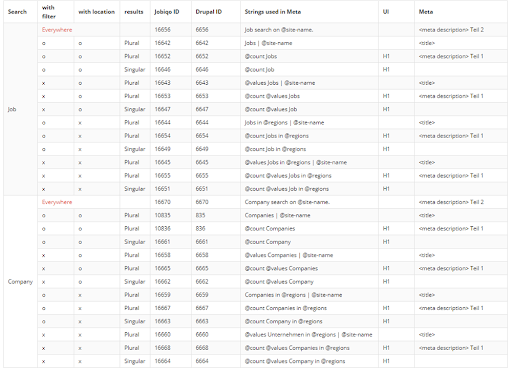
The above shown table gives an overview which strings are used to compute the SEO search contents for a page.
Example:
Job search using two facets (employment time and location): "Full time jobs in Vienna" has 20 job search results
For this search, the following Strings will be used to generate the SEO/Meta data:
- Page <title>:
- String 6645: @values Jobs in @regions | @site-name
- Full-time Jobs in Vienna | Jobiqo Job Board
- Page <h1>:
- String 6655: @count @values Jobs in @regions
- 20 Full-time Jobs in Vienna
- Page <meta description>:
- String 6655: @count @values Jobs in @regions
- + String 6656: Job search on @site-name.
- 20 Full-time Jobs in Vienna | Job search on Jobiqo Job Board
By using the Translation function of Jobiqo, the listed text pieces can be adjusted.
Especially string # 6656 is a powerful way to improve the <meta description=""> on multiple job search result pages at once, since it is appended to every auto-generated job search meta data.