- To create a submenu, log in as a content admin.
- In the upper right corner, click on the gear, then open “List Links”

- You will be redirected to the settings page. There, click on ‘Add Links’.
- Add the “Menu link title”. This is the name of the menu. Then enter the “Path”
- Path is the link to the site to which you want to redirect the user. It can be an internal page, or an URL for any other website.
- For the internal path use node/add
- For the external path, enter URL in the format: http://example.com
- Select ‘Enabled’ and ‘Show as expanded’.
- Click on ‘Save’.
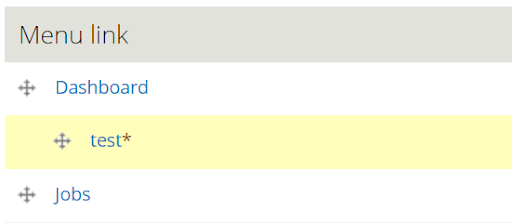
- You will then see an overview of all of your tabs. Now, move the submenu item using your mouse and shift if slightly to the right. The item will then appear under the selected menu link.
-
In the example above: test is a submenu for Dashboard, as it it place underneath the chosen
link and shifted to the right.
-
- Click on ‘Save configuration’.