Even though it is technically possible to delete a company, you may want to consider to instead unpublish the company profile in order to prevent 404s from older links which users may have saved or shared before.
In order to delete or unpublish the company and its content, follow these steps:
- Go to the recruiter user (Path: “Management” -> “Users” -> Select “edit” at the right side of the desired user row)
- At the bottom you will find the button “Cancel account”. There, you have different options you may want to consider:
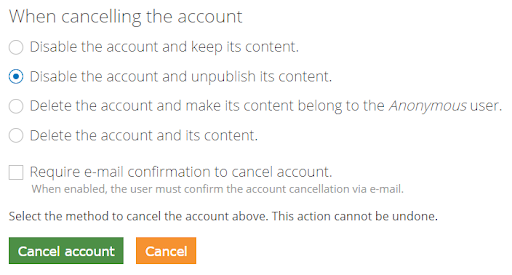
Hint: Deleting users or content is irreversible! After deleting an account or job, a link which was e.g. saved or shared before and lead to the account or job is then leading to a 404 as the content is not existing anymore instead of being unpublished.