You can edit either the public company profile in the frontend or the company profile information in the backend.
The public company profile when signed in as an admin (Frontend)
- Search for the desired company in the “Discover companies” link in the board’s header menu and go to it’s company profile by clicking it
- You can now edit the following items:
- General / Address information, about us, gallery, videos, company benefits, FAQ, contact persons and locations.
In order to change the displayed information, simply click on the pen logo for editing, on the bin logo for deleting, on “+ Add” for adding an item if possible or the “unpublish” link at the jobs section.
- Make sure to press “Save” to confirm your changes.
The company settings (Backend)
- Go to the backend view of the companies (Path: “Management” > “Companies”)
- Choose the company and click on the username (When clicking on the company name, you come to the frontend company profile mentioned above)
- You can now view the following information:
- IP Address log of devices which logged into this account and the date (can be blocked from Jobiqo Administrators)
- You can now edit the following information:
- Company profile (as mentioned above)
- Products and billings: Can be edited in the Commerce section when searching for the corresponding order-ID (Path: “Management” -> “Commerce”)
- Company profile settings: (un-)publish so that company is (not) seen as a user, promote and show on frontpage, set URL aliases if 404s occur, set meta tags for customised search experience
- Contact information: same settings as “General / Address information” in the frontend
- Recruiter dashboard’s settings such as applications, job managements and CV searches
- Please save your changes.
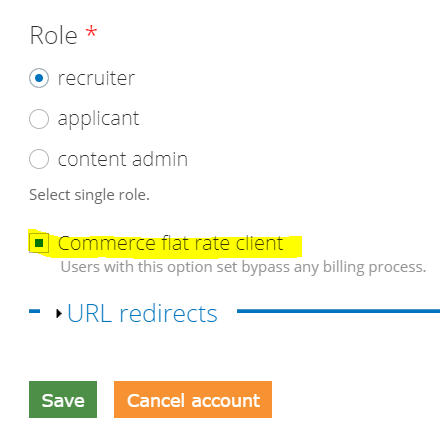
In Order to set a company as a flat rate client, please follow these steps:
- Go to the recruiter user (Path: “Management” -> “Users” -> Select “edit” at the right side of the desired user row)
- At the bottom you will find the checkbox “Commerce flat rate client”. Select it in order to set the recruiter as a flat rate client